
Overview
The XMT-R is Zonge International’s GPS-synchronized transmitter controller for field control of Zonge transmitters. It supports preset 50% and 100% duty-cycle waveforms across a wide operating range and can also run user-defined ternary transmission sequences when specialized timing is required.
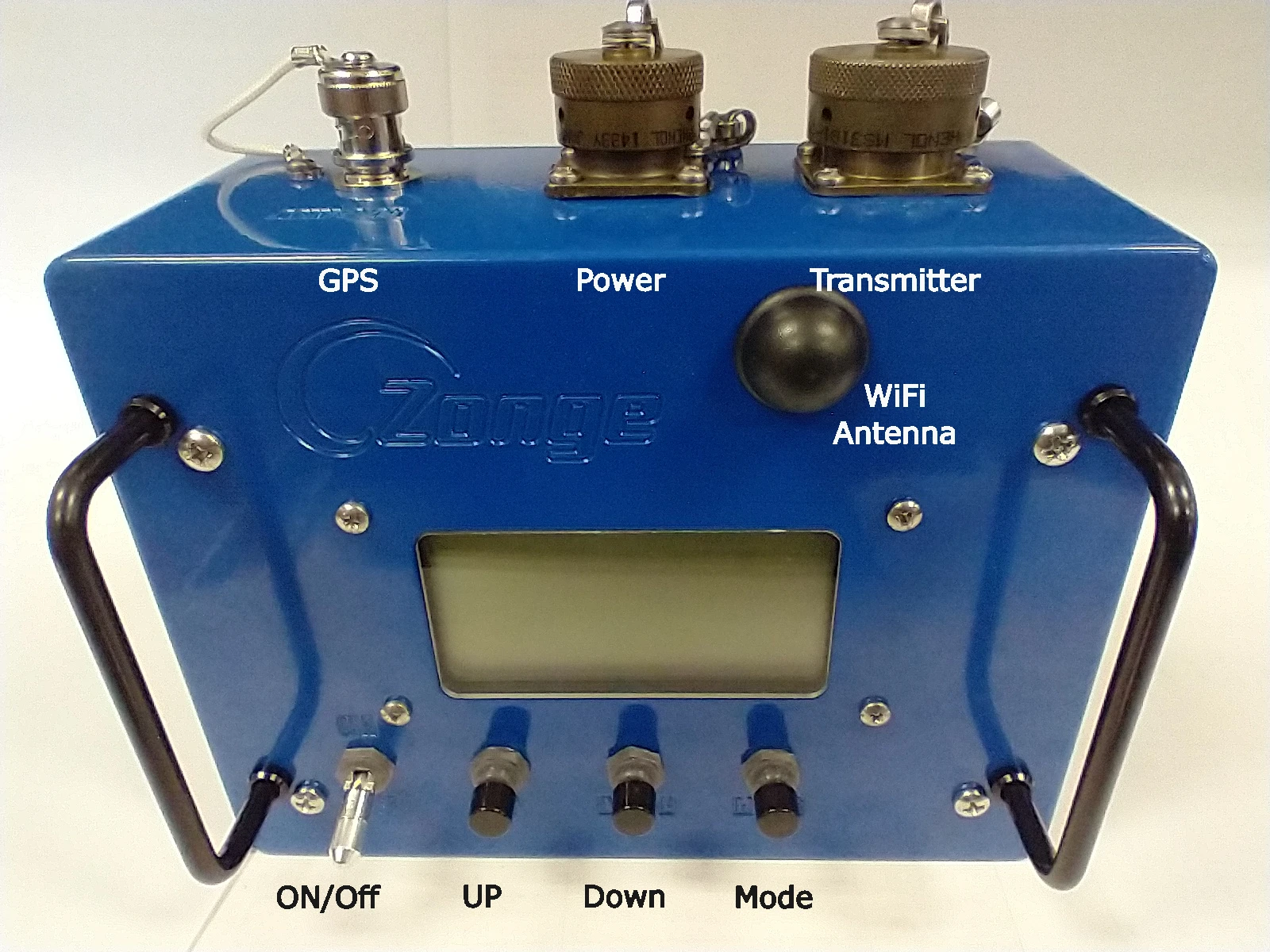
Operators can work directly on the instrument using the transflective display and hardware buttons, or remotely from a phone, tablet, or PC through the built-in Wi-Fi web interface.
Key Capabilities
- GPS-synchronized timing for repeatable transmitter control
- Compatible with all Zonge transmitters
- Local control from the front-panel display and buttons
- Remote setup and adjustment through a Wi-Fi web interface
- Preset 50% and 100% duty-cycle operation
- Advanced and custom operating modes, including user-uploaded signal profiles
- Support for specialized ternary control sequences using
.usmfiles
Controls And Interface
The XMT-R uses a 128 x 64 pixel transflective display with LED backlight, making it readable in bright sunlight as well as low-light conditions. Three front-panel buttons handle local navigation:
UPscrolls or increases valuesDOWNscrolls or decreases valuesNEXTcycles through fields and, when held, opens the menu
From the main page, the operator can directly review the selected mode and frequency, along with GPS status information such as satellite count, synchronization state, transmitter ID, and Wi-Fi state.
Operating Modes
The manual documents both Basic and Advanced workflows:
100% DC: frequency selection from0.0078125 Hzup to8192 Hz50%: frequency selection from0.0078125 Hzup to64 HzCustom: available in Advanced mode, with frequency selection from0.0078125 Hzto8192 HzMMR 5Hz: fixed 5 Hz mode for MMR applications
For safety, changing the mode on the hardware requires a press-and-hold action rather than an instant button tap.
Web Interface
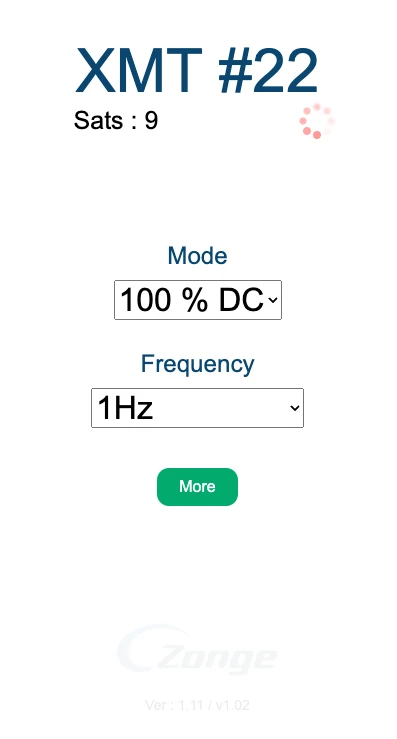
When Wi-Fi is enabled, the XMT-R exposes a web interface that mirrors the main operating information and adds faster remote control from a mobile phone or computer.
The web interface provides:
- GPS and sync status display
- transmitter ID display
- mode selection
- frequency selection
- access to additional GPS details
- switching between Basic and Advanced operation
- upload of user profiles in Custom mode
- admin tools for firmware, SPIFFS, FPGA, and Wi-Fi configuration
Connectivity
The user manual documents the following hardware connections:
- a 15-pin MIL-spec transmitter connector, with Zonge cable type
XMT/16-CN/6 - a 3-pin MIL-spec power connector
- a 50 Ohm BNC GPS antenna connector
Power requirements from the manual:
- stable
9-16 V DCsource - positive lead on pin
A - negative lead on pin
B - pin
Cnot connected
For GPS, the manual specifies a 3.3 V active GPS antenna with 15-30 dB gain.
User-Defined Sequences
One of the more advanced XMT-R features is user-defined sequence control. In addition to the built-in duty-cycle modes, the controller can generate custom ternary transmitter sequences using the two binary control lines:
ON#POL
These define the three transmitter states:
- positive ON
- OFF
- negative ON
Custom waveforms are uploaded as .usm files through the web interface. The manual describes the .usm format as a compact binary file containing:
- sequence length
- list of
POLentries - list of
ON#entries
This lets the XMT-R run specialized sequences such as user-defined PRBS-style control patterns while still using the selected base frequency from the interface.
Where It Fits
The XMT-R is well suited when a field crew needs a modern synchronized timing controller for Zonge transmitters, especially in workflows that benefit from:
- repeatable GPS timing
- remote setup from a phone or laptop
- fast switching between standard operating modes
- custom waveform control beyond fixed preset duty cycles